Battery Tester1.0
Publisher Description
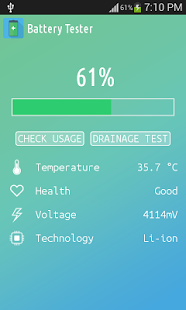
Battery Tester is elegant app that will help you follow the current battery percentage on your Android device, and even serve as a battery saver.
With Battery, every time and everywhere you will know if your battery is charged enough to play a game, a movie, or to browse the web.
Lots of Battery Tester use extra battery power for examining. It's actually Paradox! Nevertheless, Battery Tester fixed this issue.
Battery Tester indicates the battery charge level of your device. Battery Tester is an app that will help you follow the current battery percentage on your Android device, and thanks to drainage test technology it notifies you if your device needs power saving mode turned on.
Battery Tester is a new tool that will make your battery last much more.
Over time batteries loses their ability to fully charging and the only solution is recharge them frequently. Battery Tester uses proprietary technology to revamp your battery duration and make it charge again to its full potential. Forget about recharging your phone every day!!!!
It displays:
1. Temperature
2. Voltage
3. Health status
4. Technology
Using Battery Tester once a week, the life of your battery last much more.
Use Battery Tester and forget about recharging your phone every day!!.
About Battery Tester
The company that develops Battery Tester is H&Y Apps Inc.. The latest version released by its developer is 1.0.
To install Battery Tester on your Android device, just click the green Continue To App button above to start the installation process. The app is listed on our website since 2016-08-03 and was downloaded 11 times. We have already checked if the download link is safe, however for your own protection we recommend that you scan the downloaded app with your antivirus. Your antivirus may detect the Battery Tester as malware as malware if the download link to com.hnyapps.BatteryTester is broken.
How to install Battery Tester on your Android device:
- Click on the Continue To App button on our website. This will redirect you to Google Play.
- Once the Battery Tester is shown in the Google Play listing of your Android device, you can start its download and installation. Tap on the Install button located below the search bar and to the right of the app icon.
- A pop-up window with the permissions required by Battery Tester will be shown. Click on Accept to continue the process.
- Battery Tester will be downloaded onto your device, displaying a progress. Once the download completes, the installation will start and you'll get a notification after the installation is finished.
Program Details
System requirements
Download information
Pricing
Version History
version 1.0
posted on 2016-08-03
- Crash fix,- Design improvement,- Bug fix
